Customizing Your Status Page
Use customization settings to make the public page clear, recognizable, and useful for your audience.
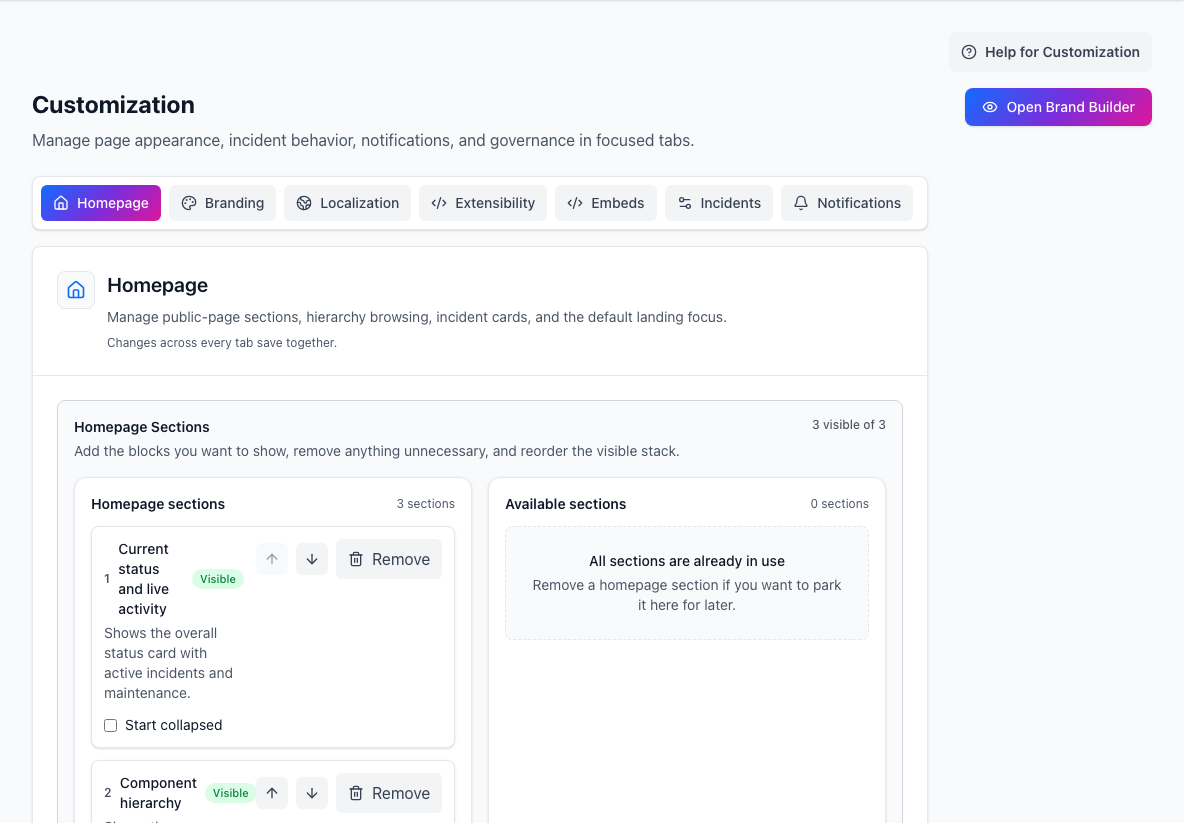
- Customization areasSwitch between homepage, branding, localization, embeds, and behavior settings.
- Homepage sectionsControls which public-page sections are visible and in what order.
Customization is more than branding. It also controls homepage layout, incident cards, hosted embeds, notification policy, and public-page behavior.
What you can customize
The customization area is organized around:
HomepageBrandingLocalizationExtensibilityEmbedsIncidentsNotifications
Start with branding and homepage layout. Tune extensibility, embeds, and notifications after the basic page reads clearly.
Branding
Branding controls how the page identifies your organization.
You can set:
- site title and subtitle
- header mode, such as logo with text, logo only, or text only
- light and dark logos
- favicon
- light and dark brand colors
- page and header background images
- body and heading font presets or managed WOFF2 uploads
- split, stacked, or centered header layout
- icon, mixed, or labeled header actions
- header links, footer copy, and footer links
Choose Open Brand Builder before publishing. Brand Builder is the recommended way to make your page feel like part of your main website without writing CSS.
Start with Modern product, Editorial, Minimal, or Heritage, or keep the StatiBeat default. You can then choose the light canvas and panel colours. Fine-tuning controls cover content width, spacing density, corners, depth, header tone, image contrast, section headings, and status-label treatment. StatiBeat derives readable text, links, controls, and dark-mode colours from those choices and warns when an unsafe surface combination has to be adjusted.
Brand Builder renders the local draft at desktop, tablet, and mobile widths across homepage, incident-detail, access, loading, empty, and error states. Check both light and dark mode there; it is the fastest way to catch poor logo sizing, missing dark-mode treatment, low contrast, or a narrow-screen layout problem. Cancel discards the draft. Publish updates only the visual settings and retains a complete visual version for rollback.
Homepage layout
The homepage usually combines:
Current status and live activityComponent hierarchyPrevious activity
You can reorder or hide sections and choose the default hierarchy browsing mode.
Use Tree View when your hierarchy is large or nested. Use Basic View when you want a flatter, more expanded page.
Default component focus
You can make the homepage open focused on a selected component or service.
This is useful when:
- most visitors care about one product area
- the page has a large hierarchy
- you want a specific service to be the first thing people inspect
Keep the default broad if visitors need a whole-platform view.
Incident cards
Incident card settings control how much detail appears on the homepage before someone opens the incident detail page.
You can choose:
- which message appears first
- whether affected components are summarized
- whether started and last-updated times appear
- whether impact text appears on collapsed cards
- whether the
View Detailslink is shown
For most teams, the homepage card should answer three questions quickly:
- What is affected?
- What is happening now?
- Where can I read the full timeline?
Incident policy controls
Customization also includes incident behavior settings such as:
- requiring a resolution reason
- allowing or preventing incident reopen
Treat these as team policy settings. Decide them before a major incident, not during one.
Hosted embeds
Hosted embeds let you place status information in other properties.
StatiBeat supports:
- a badge for docs, changelogs, or support portals
- a widget for dashboards, help centers, or launchpads
- a floating Service Notices launcher for apps, docs sites, and customer portals
The floating launcher can show a label with the notice count, the count only, or a custom label. Admins can choose the corner position, whether the launcher is draggable, the button colors, which notice types appear, how many upcoming maintenance days to include, and which services are in scope.
Embeds inherit page visibility rules. They are most useful on public pages; private pages may require visitors to authenticate before the embed can show useful data. Public custom views can also generate scoped launcher snippets when the host site should only show notices for a subset of services.
See Customization page help for a side-by-side view of the badge, widget, and floating launcher snippets, plus Content Security Policy notes for host sites.
Extensibility
Extensibility settings let you add bounded public-page customization without turning the status page into an unmanaged code surface.
Custom CSS is for presentation and visual identity. Common uses include:
- aligning typography, color, spacing, width, borders, and decorative treatments with an existing website
- styling semantic headers, sections, cards, controls, status markers, detail pages, and access states
- adding responsive visual adjustments with supported CSS rules
Use Brand Builder first, then add CSS only for visual decisions it cannot express. Advanced CSS remains the final styling layer, so it can intentionally override guided settings. Brand Builder identifies those overlaps and lets you hide CSS temporarily while checking the guided result. StatiBeat continues to own status data, incident workflow, accessibility semantics, and required controls. Custom CSS cannot add features, HTML, JavaScript, or third-party resource requests.
For the CSS selector contract, visual tokens, limits, and examples, see Public Page Customization. Use Brand Builder's built-in preview while editing. Use Open full-page preview only for a final check against real data. The full-page preview is short-lived, visibly marked as a preview, and never changes the live page. Use Published versions to restore the complete visual configuration, or CSS history when you only need to restore or disable the advanced stylesheet.
If custom styling ever causes a browser-specific problem, append statibeat_css_safe_mode=1 to the public URL. Safe mode loads the same route without customer CSS, while managed identity and platform controls remain available.
Localization
Use the Localization tab for the public document language and date/time formatting locale. These settings apply across the hosted homepage, detail pages, and activity views; they are separate from visual CSS.
Notifications
Notification settings cover:
- platform default or custom SMTP email delivery
- reply-to address
- long-running incident alerts
- long-running maintenance alerts
- Slack or email destinations for those alerts
Enable long-running alerts when your team wants a nudge if an incident has gone quiet or maintenance has overrun.
Good customization order
- Set the page title, subtitle, logos, favicon, and brand colors.
- Choose the homepage section order.
- Confirm the hierarchy view is easy to scan.
- Tune incident cards for the right amount of detail.
- Configure backgrounds, type, header composition, and navigation.
- Open Brand Builder, choose a starter style, and verify key states, widths, and color schemes.
- Add scoped CSS only for the remaining visual gap.
- Save, verify the public page, and add embeds only where another surface truly needs status.