Hierarchy Items
Hierarchy Items are the real services, products, regions, components, or other system parts that sit inside your configured hierarchy levels.
Use This Page For
- Add the actual items customers see on the status page.
- Place each item at the right level and under the right parent.
- Keep incidents, maintenance windows, and monitoring checks tied to the right part of your system.
How Items Work
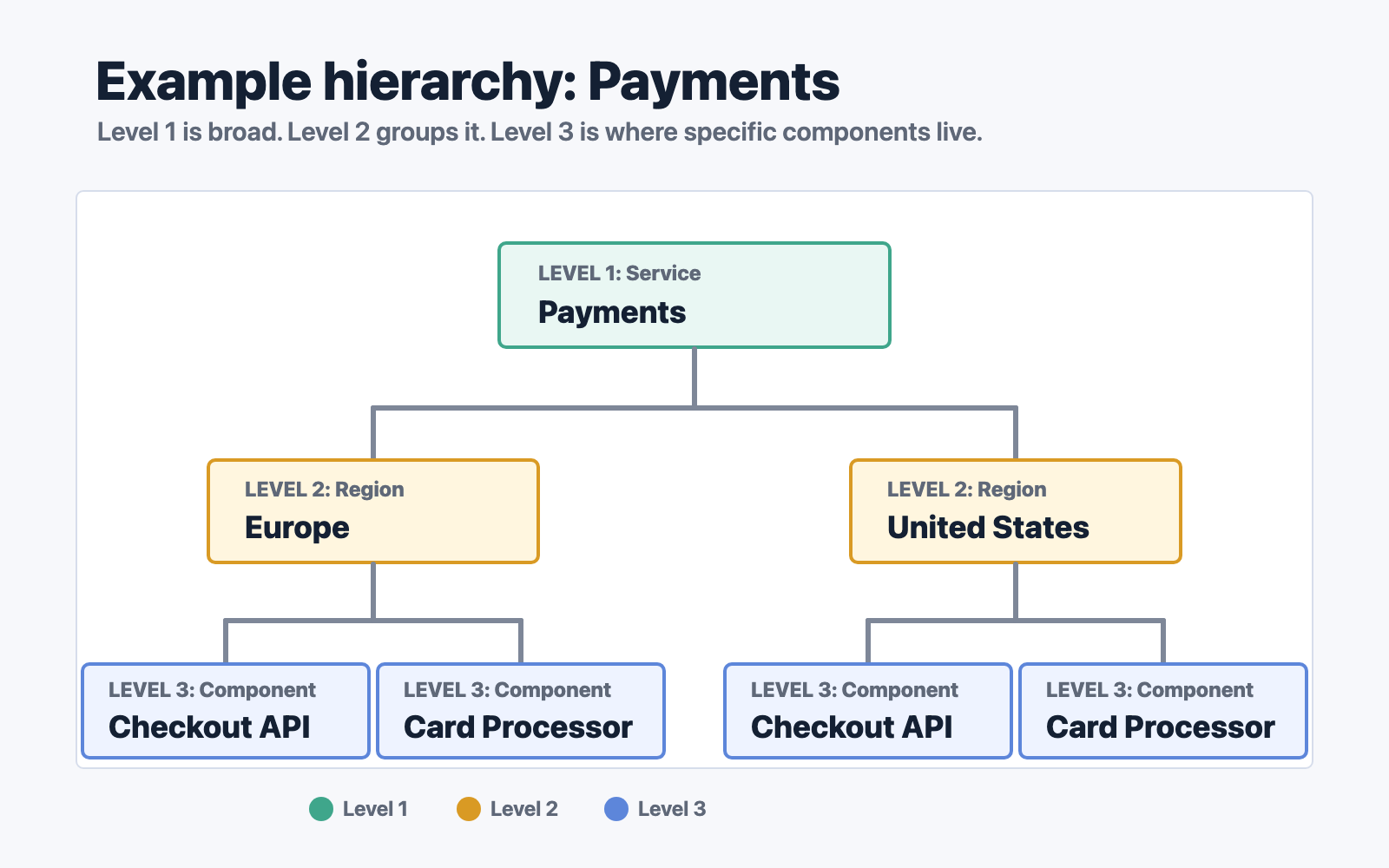
Hierarchy items are the actual nodes in the tree. Each item belongs to one level, and most items also have a parent item above them.
In the example above:
- Payments is a Level 1 item.
- Europe and United States are Level 2 items under Payments.
- Checkout API and Card Processor are Level 3 items under each region.
That gives you clear paths such as:
- Payments -> Europe -> Checkout API
- Payments -> Europe -> Card Processor
- Payments -> United States -> Checkout API
- Payments -> United States -> Card Processor
Use the most specific useful item when attaching operational work. If checkout is failing only for European customers, attach the incident to Payments -> Europe -> Checkout API. If a planned database change affects all Payments regions, attach the maintenance higher up, or select multiple affected child items when that is clearer for subscribers.
This parent-child structure is what lets StatiBeat show a detailed affected component while still helping users understand the broader service area involved.