How to Use StatiBeat
StatiBeat is the status page where you can check service health, read incident updates, and subscribe to the changes that matter to you.
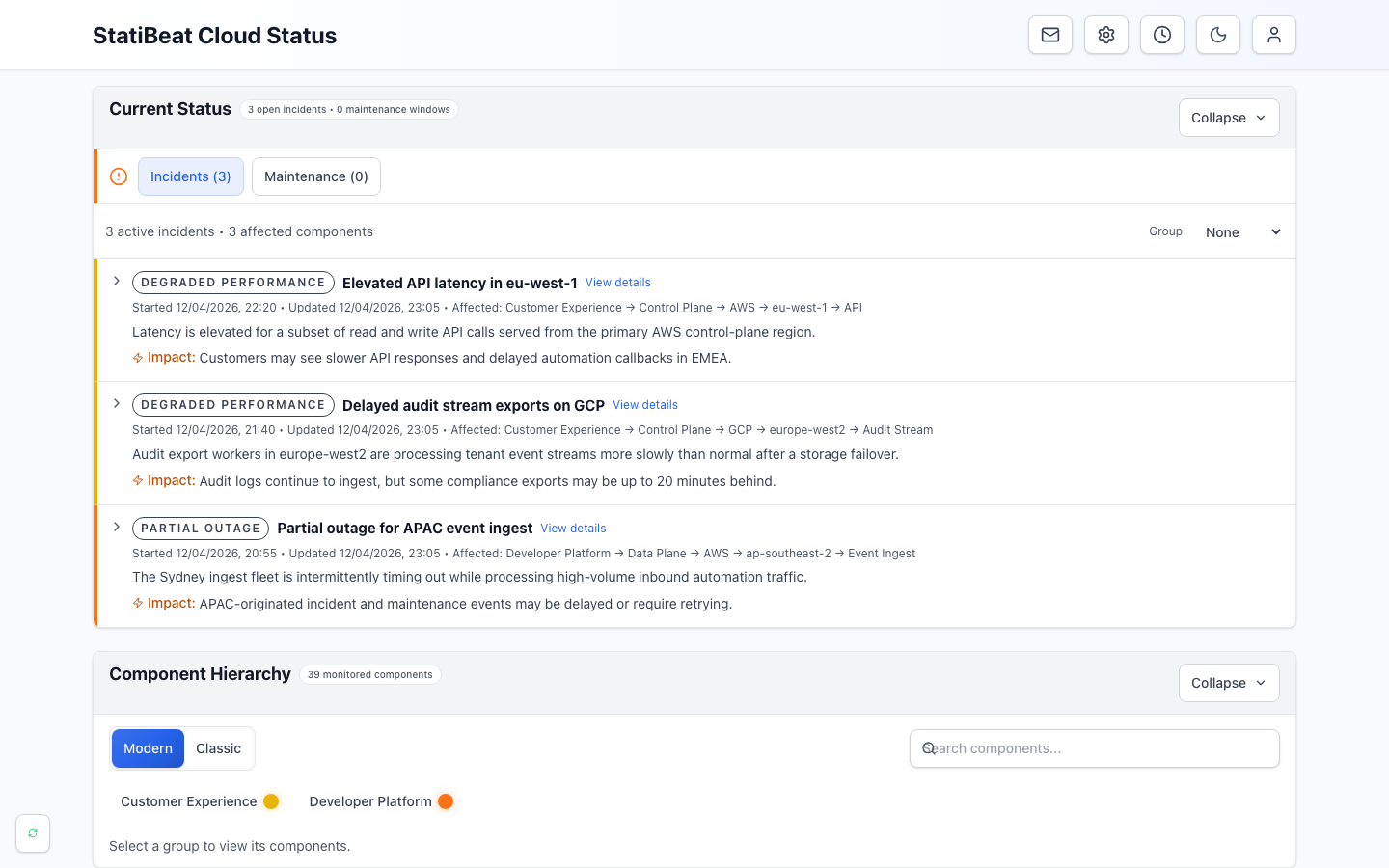
- Current statusSummarizes open incidents and maintenance at the top of the page.
- Active incidentsExplains customer impact, affected services, and the latest update.
- Component hierarchyLets readers browse the health of the products and services they use.
This guide is for the people reading the status page, not the admins configuring it.
If you are setting up or operating StatiBeat instead, start with Admin Quickstart or Automation and Integrations.
If you only need to know whether something is broken, read Reading the Status Page. If you want notifications, read Subscribing and Managing Updates. If a page asks you to sign in, read Private Pages and Viewer Access.
What you can do in StatiBeat
As a public user, subscriber, customer, or stakeholder, StatiBeat usually lets you:
- check whether a product, service, region, or component is healthy
- read active incident and maintenance updates
- explore the service hierarchy in either
Tree VieworBasic View - subscribe to updates by email or other enabled channels
- manage your preferences later from a magic-link management flow
- use a custom view if your team only needs a scoped part of the status page
- access a private page with a shared password or viewer SSO when the page is not public
For definitions of magic link, viewer SSO, custom view, and other terms, see the StatiBeat glossary.
What to expect on the public page
Most StatiBeat pages are designed around three questions:
- Is anything wrong right now?
- What part of the service is affected?
- What changed recently?
The public homepage usually answers those with:
- current status and live activity
- a searchable component hierarchy
- previous activity and resolved history
Which guide to read next
Use the rest of the Public User Guides based on what you are trying to do:
- read Reading the Status Page if you want to understand the homepage layout, hierarchy, and status signals
- read Subscribing and Managing Updates if you want alerts sent to you automatically
- read Custom Views and Feeds if you only care about a subset of the service
- read Private Pages and Viewer Access if the page asks for a password or SSO
- read Incidents, Maintenance, and History if you want help interpreting active updates and timelines
Good habits for public readers
- Look at the active incident or maintenance card first.
- Use the hierarchy to confirm whether your service area is affected.
- Subscribe before you need the updates.
- Prefer a custom view if your team only cares about one scoped part of the platform.
- Check previous activity when you want context on whether an issue is ongoing or already resolved.
If the page does not look like the examples in these guides, that usually means the page owner has chosen different sections, labels, or access rules. The core questions remain the same: what is affected, how serious is it, and what changed most recently?