Status Types
Status types define the impact vocabulary used across your status page.
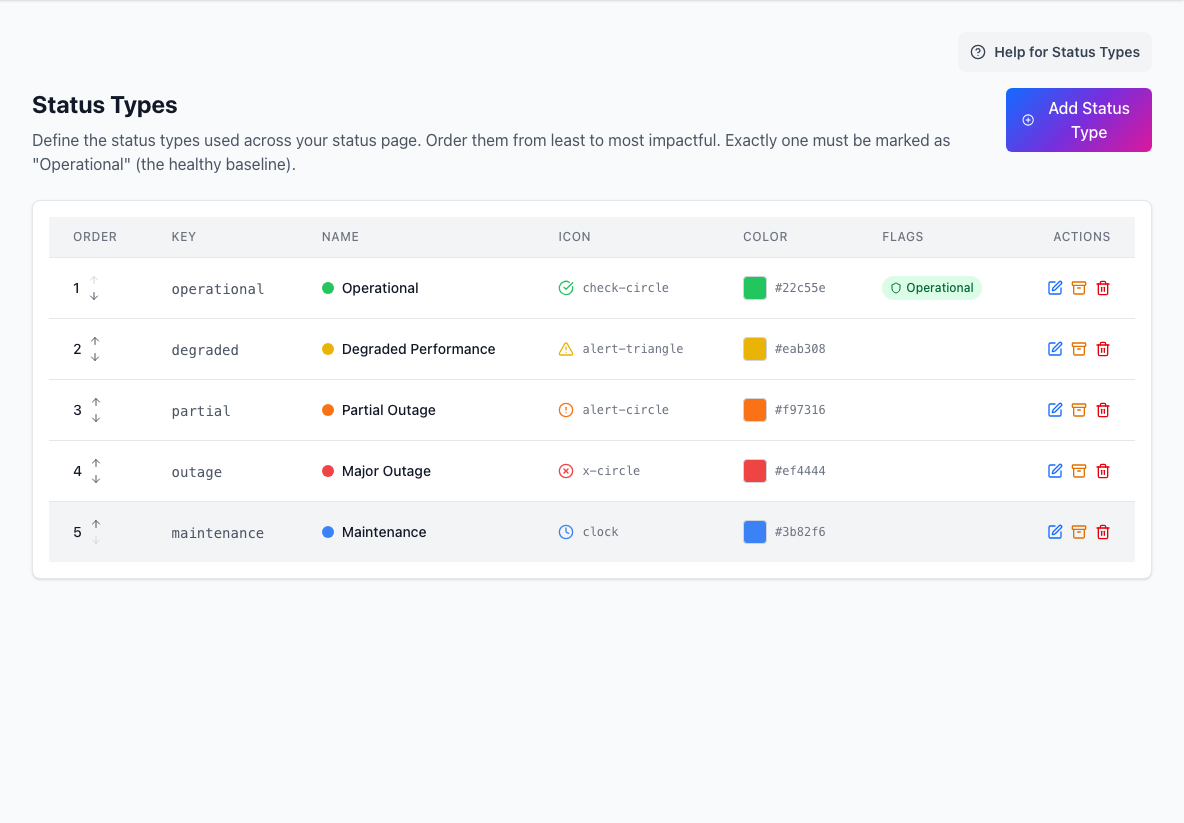
Keep status types ordered from least to most severe. Operators should be able to choose the right status quickly during an incident.
What a status type includes
A status type can include:
- key
- display name
- description
- icon
- color
- operational flag
- archived state
Exactly one status type should represent the healthy operational baseline.
Ordering
Status order is part of the communication model.
Place low-severity states first and higher-impact states later.
If two statuses feel interchangeable, simplify them. Teams are more consistent when the choices are obvious.
Keys, names, and archiving
The key is the stable identifier for the status type. Choose it carefully, because changing public terminology later can make historical incidents harder to understand.
Use archiving when you want to retire a status while preserving the meaning of older history.
Icons and colors
Icons and colors help readers scan the page quickly.
Choose combinations that remain readable in context:
- admin views
- public cards
- hierarchy badges
- incident displays
Do not rely on color alone. The display name should still communicate the meaning.
Practical guidance
Good status types are:
- easy for operators to choose
- easy for customers to understand
- few enough to be memorable
- ordered by real impact