Build a Marketplace Status Page with Terraform
See the result first, then download the Terraform project that creates its core page structure.
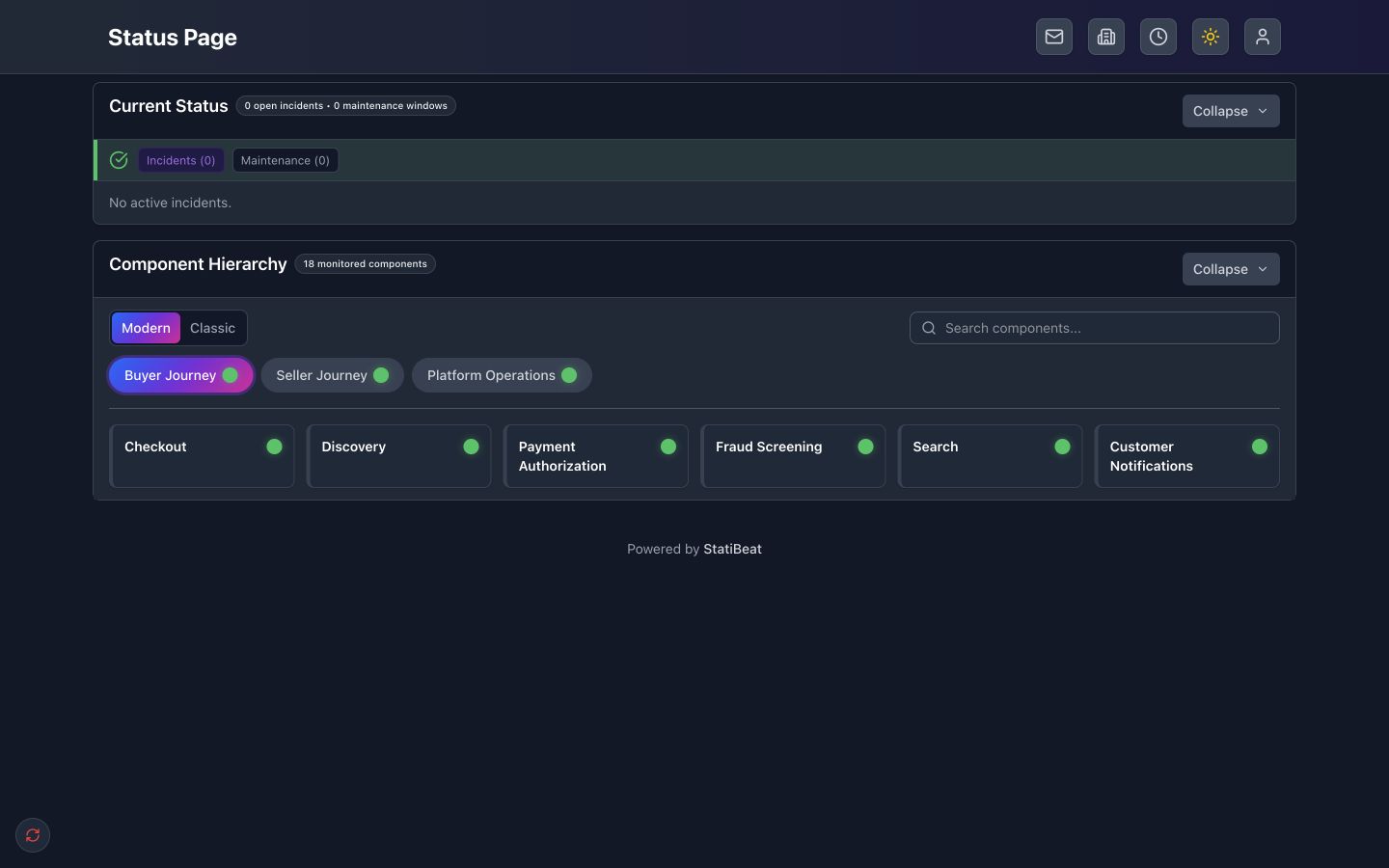
The live page is deliberately broad and shallow. It has 18 monitored components: three customer-readable surfaces and 15 capabilities beneath them.
- Buyer Journey
- Seller Journey
- Platform Operations
The example creates that hierarchy, a buyer-focused custom view, public page settings, and the site title and homepage layout. It leaves incidents, maintenance windows, subscribers, and monitoring events out because those are operational data rather than durable page configuration.
Project layout
Terraform reads all .tf files in a directory as one root module. Splitting the configuration by responsibility keeps the example easy to navigate without hiding the provider resources behind a child module.
northstar-marketplace/
├── versions.tf
├── providers.tf
├── variables.tf
├── hierarchy.tf
├── views.tf
├── settings.tf
├── terraform.tfvars.example
└── terraform.rc
The ZIP contains exactly this directory. You can also inspect and download each source file below.
Reading the hierarchy names
The Terraform names mirror StatiBeat's hierarchy editor rather than this demo's business terminology:
| StatiBeat concept | Terraform name | Northstar example |
|---|---|---|
| Level 1 name | statuspage_hierarchy_level.level_1 | Surface / Surfaces |
| Level 1 items | statuspage_hierarchy_item.level_1_items | Buyer Journey, Seller Journey |
| Level 2 name | statuspage_hierarchy_level.level_2 | Capability / Capabilities |
| Level 2 items | statuspage_hierarchy_item.level_2_items | Checkout, Discovery, Listings |
This makes the structure reusable: replace the customer-facing names and item data while keeping the level-oriented Terraform pattern.
Terraform files
- versions.tf
- providers.tf
- variables.tf
- hierarchy.tf
- views.tf
- settings.tf
terraform {
  required_version = ">= 1.5"

  required_providers {
    # This provider manages the page configuration exposed in StatiBeat's
    # Terraform workspace.
    statuspage = {
      source  = "terraform.statibeat.com/statibeat/statuspage"
      version = "2026.7.15"
    }
  }
}
# These two values select the existing StatiBeat page that Terraform will manage.
# Copy them from Terraform > Setup in that page's admin workspace.
#
# STATUSPAGE_TOKEN is the page's dedicated terraform-key. The provider reads it
# from the environment, so the credential never needs to be stored in this project.
provider "statuspage" {
  base_url    = var.statuspage_base_url
  public_slug = var.statuspage_public_slug
}
variable "statuspage_base_url" {
  description = "Page URL shown in the StatiBeat Terraform > Setup workspace."
  type        = string

  validation {
    condition     = can(regex("^https://", var.statuspage_base_url))
    error_message = "statuspage_base_url must use HTTPS."
  }
}

variable "statuspage_public_slug" {
  description = "Public slug shown in the StatiBeat Terraform > Setup workspace."
  type        = string

  validation {
    condition     = can(regex("^[a-z0-9][a-z0-9-]*[a-z0-9]$", var.statuspage_public_slug))
    error_message = "Use a lowercase public slug containing letters, numbers, and hyphens."
  }
}
locals {
  # Level 1 items are the top-level components visitors see on the status page.
  # "Surface" is the Level 1 name in this example, so these become its Surfaces.
  level_1_items = {
    buyer_journey       = { name = "Buyer Journey", slug = "buyer-journey", display_order = 1 }
    seller_journey      = { name = "Seller Journey", slug = "seller-journey", display_order = 2 }
    platform_operations = { name = "Platform Operations", slug = "platform-operations", display_order = 3 }
  }

  # Level 2 items appear beneath a Level 1 item. The level_1_key links each
  # Capability to one of the Level 1 items above without copying StatiBeat IDs.
  level_2_items = {
    checkout                    = { level_1_key = "buyer_journey", name = "Checkout", slug = "buyer-checkout", display_order = 1 }
    discovery                   = { level_1_key = "buyer_journey", name = "Discovery", slug = "buyer-discovery", display_order = 2 }
    buyer_payment_authorization = { level_1_key = "buyer_journey", name = "Payment Authorization", slug = "buyer-payment-authorization", display_order = 3 }
    buyer_fraud_screening       = { level_1_key = "buyer_journey", name = "Fraud Screening", slug = "buyer-fraud-screening", display_order = 4 }
    buyer_search                = { level_1_key = "buyer_journey", name = "Search", slug = "buyer-search", display_order = 5 }
    customer_notifications      = { level_1_key = "buyer_journey", name = "Customer Notifications", slug = "customer-notifications", display_order = 6 }

    listings            = { level_1_key = "seller_journey", name = "Listings", slug = "seller-listings", display_order = 1 }
    seller_media_intake = { level_1_key = "seller_journey", name = "Media Intake", slug = "seller-media-intake", display_order = 2 }
    seller_image_pipeline = {
      level_1_key   = "seller_journey"
      name          = "Image Pipeline"
      slug          = "seller-image-pipeline"
      display_order = 3
    }
    inventory_sync = { level_1_key = "seller_journey", name = "Inventory Sync", slug = "inventory-sync", display_order = 4 }
    seller_payouts = { level_1_key = "seller_journey", name = "Seller Payouts", slug = "seller-payouts", display_order = 5 }

    platform_payment_gateway = { level_1_key = "platform_operations", name = "Payment Gateway", slug = "platform-payment-gateway", display_order = 1 }
    platform_risk_engine     = { level_1_key = "platform_operations", name = "Risk Engine", slug = "platform-risk-engine", display_order = 2 }
    platform_search_cluster  = { level_1_key = "platform_operations", name = "Search Cluster", slug = "platform-search-cluster", display_order = 3 }
    order_events             = { level_1_key = "platform_operations", name = "Order Event Bus", slug = "order-event-bus", display_order = 4 }
  }
}

# Hierarchy levels define the customer-facing names for each depth. In the
# StatiBeat admin UI this makes Level 1 read "Surface" / "Surfaces".
resource "statuspage_hierarchy_level" "level_1" {
  depth         = 1
  singular_name = "Surface"
  plural_name   = "Surfaces"
}

# Level 2 is nested under Level 1 and is called "Capability" in this page.
resource "statuspage_hierarchy_level" "level_2" {
  depth         = 2
  singular_name = "Capability"
  plural_name   = "Capabilities"

  depends_on = [statuspage_hierarchy_level.level_1]
}

# Each entry in local.level_1_items becomes a monitored Level 1 component.
# external_id is the stable Terraform identity used to match future applies.
resource "statuspage_hierarchy_item" "level_1_items" {
  for_each = local.level_1_items

  external_id   = "marketplace-level-1-${each.key}"
  depth         = 1
  name          = each.value.name
  slug          = each.value.slug
  display_order = each.value.display_order

  depends_on = [statuspage_hierarchy_level.level_1]
}

# Each Level 2 item resolves its parent from the matching Level 1 Terraform key.
resource "statuspage_hierarchy_item" "level_2_items" {
  for_each = local.level_2_items

  external_id   = "marketplace-level-2-${each.key}"
  depth         = 2
  parent_id     = statuspage_hierarchy_item.level_1_items[each.value.level_1_key].id
  name          = each.value.name
  slug          = each.value.slug
  display_order = each.value.display_order

  depends_on = [statuspage_hierarchy_level.level_2]
}
# Custom Views are alternate public page URLs that show a selected subset of
# hierarchy items. This view includes only buyer-facing Level 2 items.
resource "statuspage_custom_view" "buyer_experience" {
  name        = "Buyer Experience"
  alias       = "buyers"
  description = "Buyer-facing checkout, discovery, and notification workflows."
  component_ids = [
    statuspage_hierarchy_item.level_2_items["checkout"].id,
    statuspage_hierarchy_item.level_2_items["discovery"].id,
    statuspage_hierarchy_item.level_2_items["buyer_payment_authorization"].id,
    statuspage_hierarchy_item.level_2_items["buyer_fraud_screening"].id,
    statuspage_hierarchy_item.level_2_items["buyer_search"].id,
    statuspage_hierarchy_item.level_2_items["customer_notifications"].id,
  ]
}
# Page Settings controls the page URL and whether visitors can access it.
resource "statuspage_page_settings" "public_page" {
  public_slug = var.statuspage_public_slug
  visibility  = "public"
}

# Site Settings controls the visitor-facing title, header, and homepage layout.
# Tree mode displays the Level 1 > Level 2 relationship created in hierarchy.tf.
resource "statuspage_site_settings" "branding_and_homepage" {
  site_title                    = "Northstar Marketplace Status"
  site_subtitle                 = "Buyer, seller, checkout, catalog, and fulfillment workflows."
  show_site_title               = true
  header_identity_mode          = "text_only"
  enable_tree_view_on_homepage  = true
  enable_basic_view_on_homepage = true
  homepage_hierarchy_view_mode  = "tree"
  show_history_bars_on_homepage = true
  homepage_history_bars_days    = 30
  show_component_by_default     = false
}
Local setup files
- terraform.tfvars.example
- terraform.rc
# Replace these placeholders with the values shown in Terraform > Setup for the
# StatiBeat page you want this project to manage.
statuspage_base_url    = "https://status.example.com"
statuspage_public_slug = "status-example"
# StatiBeat publishes provider packages through this read-only network mirror.
# The include/exclude rules affect only the StatiBeat provider; other providers
# still use Terraform's normal direct installation method.
provider_installation {
  network_mirror {
    url     = "https://terraform.statibeat.com/"
    include = ["terraform.statibeat.com/statibeat/statuspage"]
  }

  direct {
    exclude = ["terraform.statibeat.com/statibeat/statuspage"]
  }
}
The token is intentionally absent from every file. The provider reads it from STATUSPAGE_TOKEN at runtime. The mirror contains provider packages and Terraform metadata only; it does not contain customer configuration or credentials.
Before you run it
You need:
- an existing StatiBeat page that you are comfortable configuring
- its HTTPS page URL and public slug
- a dedicated
terraform-keyfrom the page's Terraform → Setup workspace - Terraform 1.5 or newer
terraform apply changes the page supplied in statuspage_base_url. Start with a new or disposable page, review the plan, and do not point the example at a production page until you understand every proposed change.
1. Download and configure the project
Download and extract the project, then copy the example variable file:
unzip northstar-marketplace.zip
cd northstar-marketplace
cp terraform.tfvars.example terraform.tfvars
Edit terraform.tfvars and replace both placeholder values with the URL and public slug shown in your page's Terraform workspace.
Keep the token out of files and shell history by reading it silently:
read -rsp "StatiBeat Terraform token: " STATUSPAGE_TOKEN && export STATUSPAGE_TOKEN && echo
2. Preview and apply
StatiBeat distributes compiled provider packages through a public, read-only network mirror rather than the public Terraform Registry. terraform.rc routes only the StatiBeat-owned provider identity through that mirror.
export TF_CLI_CONFIG_FILE="$PWD/terraform.rc"
terraform init
terraform fmt -check
terraform validate
terraform plan
terraform apply
Read the plan before approving it. A second terraform plan should report no changes after the apply completes.
How the configuration fits together
versions.tfpins Terraform and the StatiBeat provider.providers.tfconnects to the page selected in its StatiBeat Terraform → Setup workspace while keeping theterraform-keyin the environment.variables.tfdefines and validates the page URL and public slug shown in that workspace.hierarchy.tfnames Level 1 and Level 2, then creates the items visitors see at each level.views.tfcreates a StatiBeat Custom View from selected Level 2 item IDs.settings.tfmaps to StatiBeat Page Settings and Site Settings for visibility, identity, and homepage layout.
This remains a root module intentionally: users can see the actual provider resources and adapt them directly. A child module becomes useful when the same page pattern needs to be instantiated repeatedly with a stable input contract.
Once this pattern works for your page, add status definitions, preset messages, Beats, feeds, or more custom views as separate resources.