Setting Up and Using the Slack App
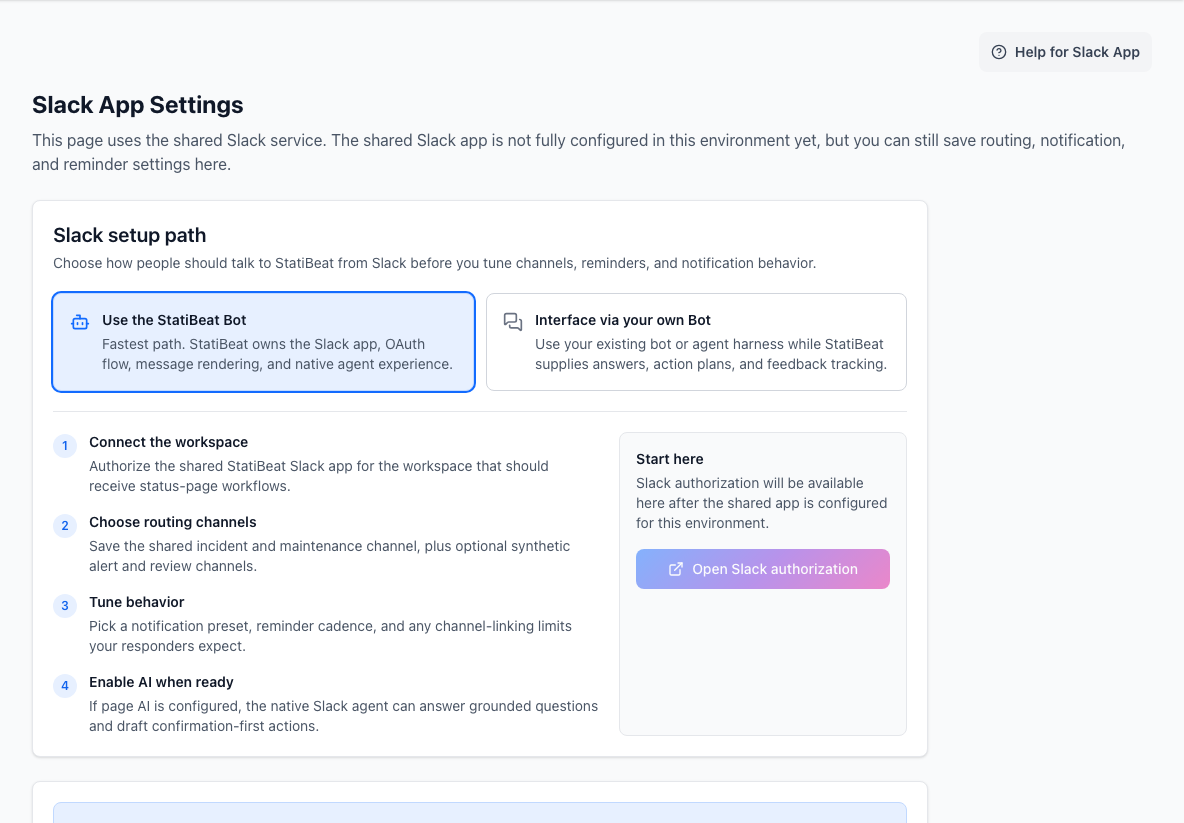
StatiBeat includes a dedicated Slack admin area with connection, channel behavior, and notification controls.

Open Slack App, review the connection card, click Add to Slack, and authorize the StatiBeat Slack app for the workspace.
This guide is based on the current Slack UI in:
application/frontend/src/pages/admin/SlackSettings.jsxapplication/frontend/src/pages/admin/slackSettings/hooks/useSlackSettings.jsapplication/frontend/src/pages/admin/slackSettings/components/SlackManualSettingsPanel.jsx
What the Slack admin page contains
The current UI is one continuous admin surface grouped into:
ConnectionChannelsBehavior & NotificationsReminders
Slack app setup
In the supported hosted flow:
- the hosted app name and region are shown in the admin UI
- the connection starts from the Slack App connection card
- admins click
Add to Slackto authorize the app for the workspace - you do not create a separate Slack app or paste client credentials for this page
The connection card explains that the workspace connects through the managed StatiBeat Slack service and can show environment details such as:
- app name
- region
- service URL
The supported hosted flow does not require a separate Slack app per workspace.
After clicking Add to Slack, the admin completes OAuth in Slack and returns to StatiBeat when authorization succeeds.
The current Slack hook calls an OAuth initiation endpoint and then redirects the browser to the returned Slack authorization URL. On success, the UI reports that the workspace connected successfully.
The same admin screen also supports clearing the Slack configuration entirely, which disconnects the app.
Channel linking behavior
The Channels section exposes three channel linking modes:
No LinkSoft LimitHard Limit
Their behavior in the UI is:
No Link: channels are not linked to incidents, and any channel can create unlimited incidentsSoft Limit: warn if a channel already has an open incident, but still allow anotherHard Limit: prevent a new incident in a channel that already has one open
Global announcement and reminder behavior
The Slack settings UI currently supports:
- a shared incident and maintenance channel
- a synthetic alert channel
- a synthetic review channel
- global announcements toggle
- global reminders toggle
- per-channel reminder overrides
- behavior presets for common notification styles
- advanced per-event controls when a team needs more exact routing
- notification toggles for create, update, and resolve events
- edit notification mode
- workflow confirmation mode for AI-thread initiated actions
Channel fields are picker-first when the workspace is connected. Admins can search accessible Slack channels by name, then fall back to manual channel-ID entry only when needed.
If shared announcements are enabled, incident and maintenance notifications can be mirrored to the shared incident and maintenance channel. Synthetic channels remain visible even when shared announcements are disabled, so admins can stage those routes in advance.
The incident-creation allowlist also accepts:
- exact Slack channel IDs
- exact channel names
- wildcard channel-name patterns such as
incident-*
If your team runs incidents in dedicated Slack channels, the reminder and channel-link settings are worth configuring early so you do not have to clean up notification behavior later.
If global reminders are enabled, the admin can configure:
- default reminder interval in minutes
- whether the interval is locked
- maintenance pre-start reminder offsets
- maintenance pre-end reminder offset
- maintenance overrun reminder cadence
The current workflow confirmation modes are:
Ephemeral onlyReply in threadThread + channel
Those modes control what happens after someone completes a workflow from an AI thread. Slash commands and non-threaded workflows keep the standard channel behavior.
Post-Incident Report awareness
Resolved-incident list and query flows in Slack can indicate when a published Post-Incident Report exists.
In v1, Slack is intentionally read-oriented for this feature:
- Slack can point people toward the incident detail page
- the application UI remains the place where admins draft, publish, or unpublish the
Post-Incident Report - publishing a report does not create a separate Slack authoring workflow or fanout event
Per-channel overrides
If both global reminders and channel overrides are enabled, the UI supports per-channel reminder configuration.
The current workflow is:
- choose a Slack channel
- review the effective reminder settings that load automatically for that channel
- save an override or clear it
The form also supports locking the reminder interval at the channel level.
The override editor loads the currently saved Slack settings for the selected channel. Unsaved page-level reminder changes do not appear there until the main Slack settings form is saved.
Agent V5 assistant
For natural-language requests, Slack mentions and Slack assistant threads both call the backend Agent V5 runtime. The Slack service validates the event, checks user linking, streams delivery, renders the response, records feedback, and stays out of model orchestration.
Agent V5 keeps operational safety server-side:
- grounded reads use backend-owned capabilities and permission checks
- write requests return conversational confirmation prompts before execution
- the final Slack text is rendered from
message_markdownfirst, with optional artifacts, citations, and actions only when useful - confirmation replies stay conversational instead of switching to a separate robotic workflow surface
The non-agent path remains available through slash commands and explicit helper mentions. Natural-language assistant requests require a linked Slack user and the required page permissions.
Grounded Slack query handling
For natural-language operational questions, StatiBeat uses backend-owned capability selection, bounded data loading, final validation, and conversational composition instead of exact phrase matching. The backend can load active incidents, resolved incident history, incident details and timelines, maintenance, Beats, analytics, Slack linkage, and retained turn history within fixed limits.
Examples:
Do we have any incidents ongoing?uses active incident data and can return a deterministicNo open incidentsanswer when the active list is empty.What historical incidents have we had?uses resolved incident history rather than being intercepted by the active-incident empty state.Do we have any incidents in the past 24 hours?uses exact UTC window boundaries and filters current or resolved incident data to that window.Show the updates for that outagemay ask a follow-up question when the incident cannot be resolved safely from the Slack thread or page data.
The LLM never receives provider keys or raw credentials, and it cannot execute direct writes. Mutations continue through the confirmation-first action flow.
Capability matrix
| Surface | Agent required | Supported workflows |
|---|---|---|
/statibeat slash commands | No | Incident create, update, acknowledge, resolve, reopen, delete, list, maintenance list and lifecycle workflows, reminders, and deterministic modal flows |
Helper mentions such as help, connect, disconnect, whoami, list | No | Account linking, identity checks, page and channel discovery, list shortcuts, channel-link helper flows, and help |
| Natural-language app mentions | Yes | Agent V5 queries and confirmation-first actions when the channel/page/user context is eligible |
| Slack assistant threads | Yes | Page-aware suggested prompts, grounded query answers, conversational confirmation, refinement, and execution |
| Work Object unfurls | No for safe previews, Yes for richer linked-user detail | Incident, maintenance, and Beat summaries from supported StatiBeat URLs |
| Web admin assistant | Yes | The same Agent V5 capability runtime and conversational confirmation behavior |
Shared-agent action coverage
Natural-language Slack requests can prepare confirmation-first actions for:
- incidents: create, update, acknowledge, resolve, reopen, and delete
- maintenances: create, update, complete, cancel, and delete
- Beats: create, update, pause, resume, run now, approve a pending recommendation, and reject a pending recommendation
- Beat Groups: create and update
The agent can also answer grounded operational questions about:
- incident detail, timeline updates, resolved incident history, and post-incident report state
- maintenance detail and update history
- Beat inventory, Beat Groups, and pending Beat recommendations
- recent agent action history, including requester and confirmer
- status-page analytics where available
- Slack workspace, channel, page, incident, or maintenance linkage from the current Slack context
Unsupported and unavailable requests
When the assistant is unavailable for the current page, natural-language Slack requests respond with an explanation and a slash-command or helper alternative when one exists. For example, an incident creation request can point users back to /statibeat create, and identity or page questions can point users to helper mentions such as whoami.
When a request is outside the supported agent scope, Slack returns an explicit unsupported response instead of falling back to the retired legacy parser. Examples include arbitrary subscriber template changes, broad settings mutations that do not map to a named capability, or requests where the target incident, maintenance window, Beat, or Beat Group cannot be resolved.
Collaboration and audit
Slack action plans are collaborative by default. Any linked teammate with the required page permissions can refine or confirm a pending plan in the same thread unless a future capability explicitly restricts confirmation to the requester.
Every confirmation re-checks:
- linked account state
- page permissions and page/workspace scope
- plan expiry
- target existence and stale-guard metadata
- destructive-action warnings
Execution summaries and audit answers include the requester, confirmer, Slack channel, Slack thread, source surface, capability key, and target references when those fields are available.
Legacy freeform AI retirement
The old Slack-specific freeform parser is no longer a production execution fallback for new natural-language mentions. Eligible natural-language app mentions and Slack assistant turns use Agent V5; ineligible turns are rejected with clear guidance.
Slash commands and helper mentions are not part of that retirement. They remain deterministic workflows.
Beat Groups in Slack
Slack now distinguishes between standalone Beats and grouped Beats.
- if a failing Beat has no Beat Group, Slack keeps the familiar Beat-centric summaries
- if a failing Beat belongs to a Beat Group, Slack includes grouped investigation context so responders can see that incident ownership, channels, and customer-facing messaging may live on the Beat Group instead
- grouped summaries call out unhealthy Beat Groups as separate operational surfaces rather than treating every member Beat as a separate incident owner
This is especially useful when several checks such as latency, HTTP status, and ping should all roll up into one website-health incident thread.
Slack Assistant and rich previews
The shared Slack app manifest now also includes the prerequisites for Slack's newer agent and Work Object surfaces:
files:writeso failing Beat alerts can upload a captured browser screenshot and render it inline when one existsassistant:writeplus theassistant_thread_started,assistant_thread_context_changed, andmessage.imevents for the Slack assistant containerlinks:readandlinks:writepluslink_sharedandentity_details_requestedfor rich unfurls and Work Object detail views- the
statibeat.comunfurl domain and the initial rich preview entity types used for incidents, maintenances, and Beats
The assistant runtime is owned by the backend Agent V5 boundary. The Slack
service validates events, links users, streams delivery, and records feedback;
it does not contain a separate Slack-local AI runtime. Work Object previews are
still controlled separately with SLACK_WORK_OBJECTS_ENABLED.
Slack only allows up to five unfurl domains per app. In this first rollout,
platform-hosted *.statibeat.com links can receive the new rich previews, while
arbitrary customer custom domains continue to behave like normal links.
With the manifest installed, the current shared Slack runtime supports:
- richer failing Beat alerts that include metric trends plus best-effort inline screenshot previews
- the Slack assistant container with page-aware suggested prompts
- native
assistant.threads.setStatusplus streamed task-plan updates for multi-step replies - confirmation-first maintenance planning from the assistant surface
- Work Object unfurls for supported incident, maintenance, and Beat URLs
- richer flexpane detail views refreshed by
entity.presentDetails
Linking and trust boundaries
The Work Object unfurl card is intentionally bounded because everyone in the conversation can see it. StatiBeat only includes safe summary fields there, such as incident status, maintenance schedule, or a Beat's current stage.
Richer detail views in the flexpane are linked-user aware:
- if the Slack user is not linked to StatiBeat, the flexpane prompts them to complete the link flow first
- if the link is stale, the entity no longer exists, or page-scoped access is insufficient, Slack shows a graceful partial-view error instead of raw backend output
Confirmation-first behavior still applies
The Slack assistant shell changes the presentation layer, but it does not change StatiBeat's safety model:
- reads can stream intermediate steps and visual evidence
- writes still stop at a server-owned plan preview
- incident, maintenance, Beat, Beat Group, and hierarchy changes still require an explicit confirm action before execution
Rollout and rollback
Recommended rollout order for shared environments:
- update or reinstall the shared Slack app manifest so the new scopes, events,
and Work Object entity types are present
This is also the step that grants
files:write, which Beat screenshot uploads need for inline Slack previews. - verify Slack assistant startup, streamed replies, and confirmation-first planning in a test workspace
- enable
SLACK_WORK_OBJECTS_ENABLED=true - verify incident, maintenance, and Beat unfurls plus flexpane detail views
- trigger a failing Beat with browser capture enabled and confirm the alert either shows the screenshot inline or falls back to the text summary without suppressing delivery
Rollback is straightforward:
- disable
SLACK_WORK_OBJECTS_ENABLEDto fall back to normal links while keeping the Slack assistant available - rollback assistant behavior by deploying the previous backend Agent V5 runtime and Slack transport build together; there is no legacy threaded-agent fallback
- the shared app manifest can remain installed; runtime flags control whether the richer product behavior is active